Microsoft Teams Rooms vs. BYOD: the differences at a glance
Hybrid meetings have now become the standard for many organisations. Employees work alternately from the office, from home or from other locations.
Many organisations have adapted or newly equipped their meeting rooms accordingly over the past few years with good cameras, clear audio and user-friendly controls.
Yet the meeting experience sometimes still falls short of expectations.
We see organisations looking for ways to improve the effectiveness of hybrid meetings. At AVEX, we help them take the next step.
Many of our customers started hybrid working with BYOD (Bring Your Own Device): connecting a laptop to a screen and, if required, a USB camera or speaker. That works, especially at the beginning. But once hybrid meetings become structural, organisations often run into limitations.
In this article, our colleague Patrique Petit, Microsoft 365 specialist at AVEX, explains when BYOD is sufficient and when Microsoft Teams Rooms is the better choice.
“We see that many organisations are looking for ways to improve the effectiveness of hybrid meetings.” Patrique Petit Microsoft Office 365 Specialist
In this article, you will read:
- What BYOD is and what its advantages and limitations are
- When BYOD is no longer sufficient
- What Microsoft Teams Rooms is
- What works better with a native Microsoft Teams Room compared to BYOD
- When to choose which option
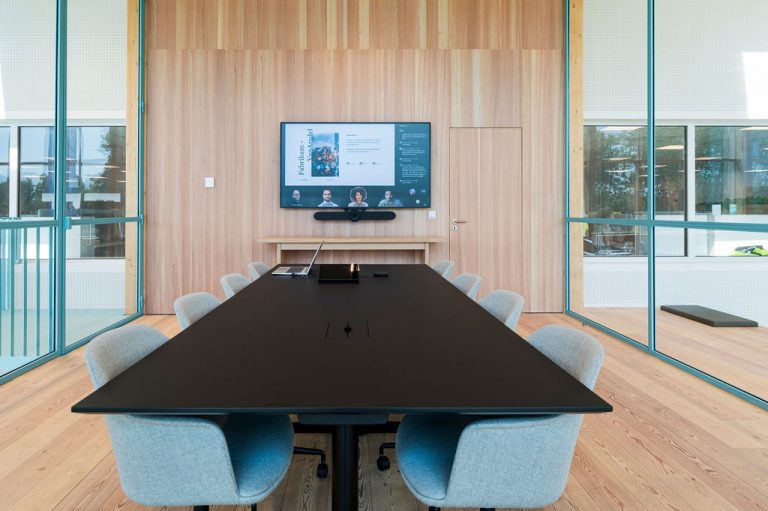
After reading, you will have a better understanding of the differences between BYOD and Microsoft Teams Rooms, which option fits which situation and how Microsoft Teams Rooms can take hybrid meetings to the next level.
What is meant by BYOD (Bring Your Own Device)?
With BYOD, a user starts the meeting from their own laptop. The laptop is connected to the screen, camera and audio equipment in the room. The laptop functions as the heart of the meeting.
Advantages of BYOD:
- Low investment
- Flexible and quick to deploy
- Suitable for small rooms or occasional use
But in practice, we also see limitations:
❌ Every meeting starts differently
❌ More dependent on the user’s knowledge and preparation
❌ Greater chance of technical problems
❌ Different settings
❌ Varying audio and video quality
❌ Security levels differ
❌ Limited management capabilities
BYOD is therefore primarily an entry-level solution that works perfectly well for some rooms.
When BYOD is no longer sufficient
As soon as meeting rooms are used more intensively, the need changes*. Think of daily hybrid meetings, meetings with multiple locations, project and management meetings, and customer and partner meetings.
In these situations, reliability and consistency are more important than flexibility. Users no longer want to think about cables, settings or devices. The meeting should simply start. And run professionally.
*The Work Trend Index from Microsoft shows that workload and the number of meetings remain high: in recent years, weekly meeting time for the average Teams user has increased significantly, and AI is being widely adopted to save time and collaborate more effectively. At the same time, we see that hybrid working is structural: since the pandemic, the volume of online and hybrid meetings has increased significantly; earlier Work Trend Index measurements already showed total meeting time increasing by hundreds of per cent, a trend that has since appeared to have become the new normal. This underlines the need for stable, standardised meeting rooms.
How does Microsoft Teams Rooms work?
Microsoft Teams Rooms (MTR) is a dedicated meeting solution, specifically designed for physical meeting rooms. The room has its own Teams account and works with certified audio and video equipment.
A meeting starts with one press of a button on the touch panel in the room. A laptop is not required. This provides a fixed, recognisable way of working and enables centralised management.
Why this matters: Teams Rooms is not “just another device”, but a standard way of working for every room. From this standard, it logically follows what works better: ease of use, audio/video quality, AI/Copilot results, speaker recognition and management/standardisation.
We will go through these five points in a little more detail below.
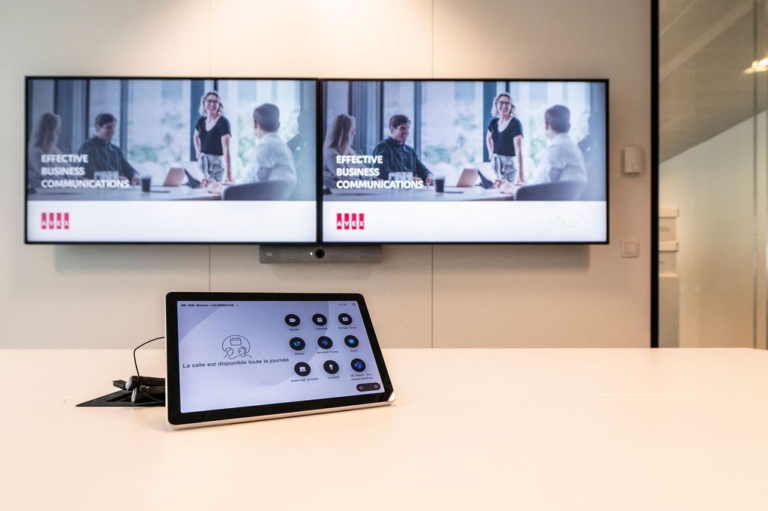
Below is an overview of the comparison across the five areas.
BYOD vs Microsoft Teams Rooms – comparison across 5 areas:
| Area | BYOD | Microsoft Teams Rooms |
| Ease of use | Every meeting starts differently, depending on the user and laptop | Fixed way of working, one touch; always the same |
| Audio & video | Varying quality, depending on equipment | Certified equipment, optimised for the room |
| AI & Copilot | Works, but with limited context | Better transcripts, clearer speaker distinction, richer output |
| Speaker recognition | Limited availability | Built in: who said what, recorded per person |
| Centralised management | Little central control, dependent on users | Centralised management, fixed policy per room, scalable |
Let’s take a slightly closer look.
What works more smoothly with a native Microsoft Teams Room compared to BYOD?
1. Ease of use = less hassle
2. Better audio and video = more effective meetings
3. AI and Copilot: where Teams Rooms really stands out
4. “Who said what?” suddenly becomes important
5. Management and standardisation
When should you choose which?
Looking at different types of rooms, we roughly see the following division:
| Room type | Typical use | Recommendation |
| Small huddle / focus room (2–4 people) | Ad hoc meetings, stand-ups, short consultations | ✓ BYOD ✓ Teams Rooms
BYOD is sufficient for occasional use. Teams Rooms pays off for daily hybrid use or when Copilot meeting notes are desired. |
| Medium-sized meeting room (6–10 people) | Regular meetings, consultations, project discussions | – BYOD ✓ Teams Rooms
Teams Rooms recommended. Multiple speakers require good microphone coverage, framing and stable transcription. |
| Large project / boardroom (10+ people) | Management meetings, decision-making, customer and partner meetings | – BYOD ✓ Teams Rooms
Teams Rooms strongly recommended. Decision quality, accountability and user experience carry significant weight. |
Conclusion
BYOD remains a perfectly good solution for simple or occasional meeting rooms. But for organisations that want to improve hybrid working structurally, Microsoft Teams Rooms is the logical next step for many meeting rooms. It provides greater ease of use, better hybrid collaboration and higher meeting quality.
AVEX is a certified Microsoft Teams Rooms partner
At AVEX, we help organisations make the right choices in the enormous jungle of possibilities.
AVEX is a certified Microsoft Teams Rooms partner. This means we do more than just supply and install the hardware. We advise on the right configuration for each room, integrate MTR into the existing IT environment and ensure that everything works together.
We work with various Microsoft-certified manufacturers such as Cisco, Crestron, HP Poly, Jabra, Lenovo, Logitech, Shure and Yealink. Our experience as a Microsoft specialist means we have in-depth knowledge of Teams integrations.

Patrique Petit
Microsoft Office 365 Specialist

Publication date
18 March 2026
Updated date
24 August 2026
Sector
All Sectors, Central Government, Culture, Sports & Recreation, Education, Financial & Professional Services, Government, Healthcare, Hospitality, Local Government, Public Safety & Security, Retail, Trade & Industry
Solution
Boardrooms, MDT Rooms, Meeting Rooms
Keep discovering